Home

A Game Boy-centric frontend for Anbernic H700 handhelds running BaseOS. It plays GBA, GBC and GB games, and SNES and PlayStation games too, on a shelf of cartridges and discs that go down into the handheld when you play them.
Made for the RG35XX SP first; the rest of the H700 family follows.
The shelf
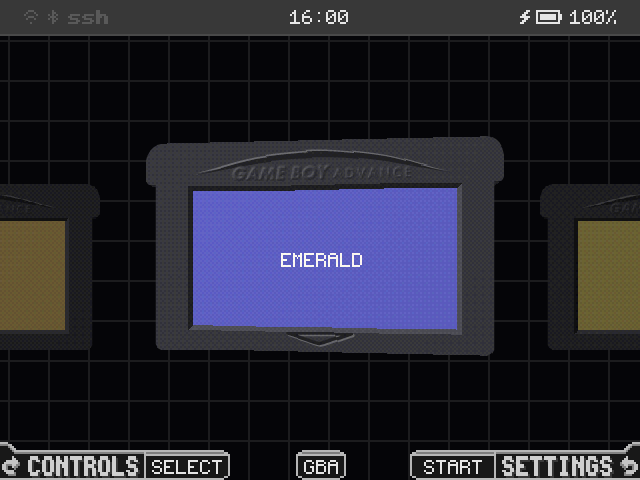
Game Boy carts in their own plastics, SNES carts and PlayStation discs, with real label scans. The one you are on floats and sways, and goes down into the handheld as the game comes on like a tube TV.
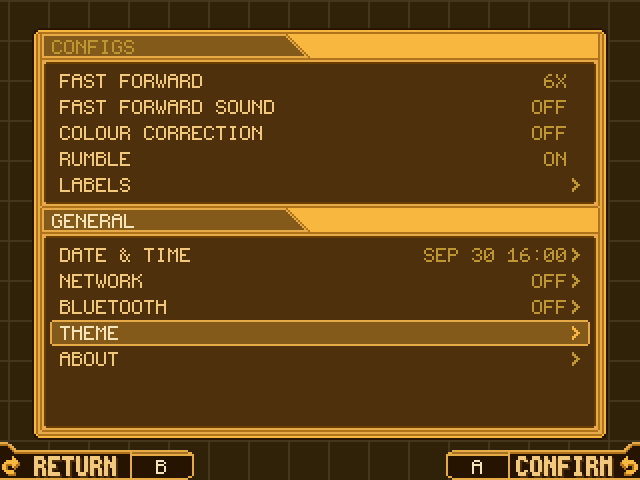
Settings
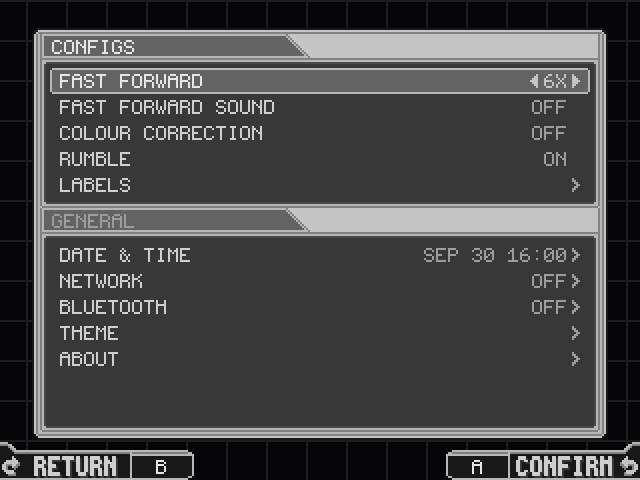
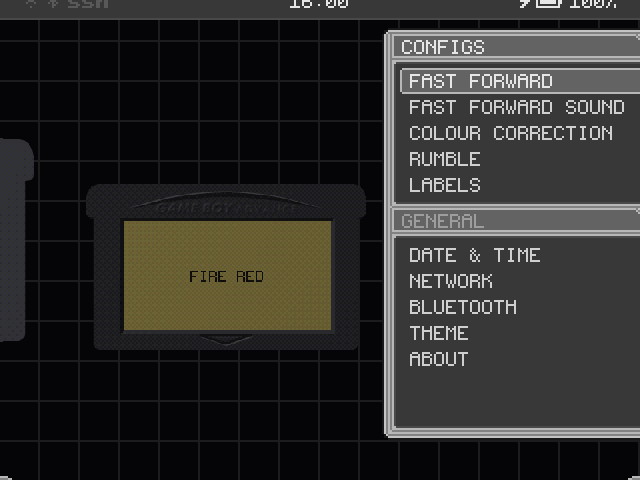
On START, in windows in the style of Mega Man Zero's menus that slide from screen to screen.
Five cores
mGBA and gpSP for the GBA, Snes9x and Supafaust for the SNES, chosen per cart, and PCSX ReARMed for the PlayStation.
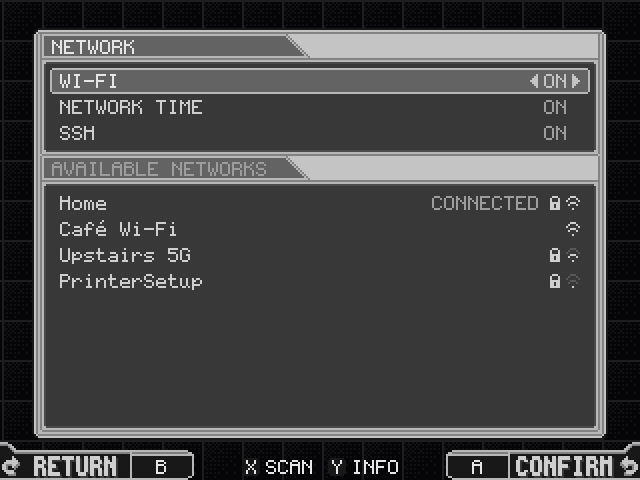
Network
Home Wi-Fi with SSH and SFTP, network time, and cart labels from ScreenScraper.
Screens

Install
omega-zero runs on BaseOS, a minimal Linux for H700 handhelds. You need the BaseOS image for your exact model.
It runs from the card BaseOS is on, in SD1, or from a second card in SD2 beside it.
- Download the BaseOS image for your device from the
BaseOS releases (for
example
baseos-rg35xxsp-*.img.zip) and write it to a microSD card with a tool such as Raspberry Pi Imager. - Put the card in the slot marked SD1 (TF1) and power on. BaseOS expands its storage, then says no frontend was found. Power off.
- Download the latest
omega-zero
release, unzip it, and copy the contents of the
omega-zero-vX.Y.Z/folder to the root of the card. - Put your games in
Games/GBA,Games/GB,Games/GBC,Games/SNESandGames/PS1. Labels are optional: omega-zero can fetch them itself over Wi-Fi. - Put the card back in SD1 and boot. On the shelf, START opens Settings and a tap of SELECT shows every button.
omega-zero-vX.Y.Z-h700.zip
  omega-zero-vX.Y.Z/      copy its contents to the card's root
- Write BaseOS to the card in SD1 as above.
- Format a second card as FAT32 or exFAT with an MBR partition table, and copy the
contents of the release's
omega-zero-vX.Y.Z/folder to it. - Add your games to the second card and put it in SD2. BaseOS runs omega-zero from SD2 whenever one is there.
omega-zero creates these folders on first boot. Nothing loose at the top of
Games/, Saves/, Labels/ or States/
reaches the shelf.
Games/GBA/     your legally obtained games,
Games/GB/      a folder for each platform
Games/GBC/
Games/SNES/    .sfc and .smc
Games/PS1/     .cue with its .bin, .chd, .pbp or .m3u,
               also one folder down
Labels/...     cart labels: a .png named after the ROM
Saves/...      battery saves, per platform
States/...     save states, per platform
BIOS/          gba_bios.bin, gbc_bios.bin, gb_bios.bin
               for the boot animations, and a
               PlayStation BIOS such as scph5501.bin
               (all optional)
Wallpapers/    .png wallpapers for the shelf
Overlays/...   your overlays, per platform
Config/        settings, wifi.conf with the networks
               you have joined, your ScreenScraper account
System/        omega-zero itself, its cores and its
               licences; replaced on every update
A label for Games/GBA/Metroid Fusion.gba is
Labels/GBA/Metroid Fusion.png. Per-cart shell colours go in
Config/cart_shell.ini, which can also stand a SNES cart in the American
shape, ntsc, or the Super Famicom's, sfc.
A PlayStation game on several discs is one game on the shelf: its files named
(Disc 1), (Disc 2) and so on are put together, or list them
in an .m3u yourself.
Replace the System/ folder on the card omega-zero runs from with the one
from the new release. Your games, saves, save states, labels, wallpapers, overlays and
settings all live outside System/.
Once Wi-Fi is set up, you can also copy the new System/ over SFTP.
BaseOS runs an SSH server with SFTP. On Settings > Network, the SSH row switches
it ON or OFF, and Y on that row shows how to log in: the handheld's address, its name
such as rg35xxsp.local, user root, the password and port 22.
SFTP uses the same login.
The card omega-zero runs from is /mnt/sdcard, so games go in
/mnt/sdcard/Games/GBA and so on. Use any SFTP client, such as
Cyberduck,
FileZilla or scp.
scp "Metroid Fusion.gba" root@rg35xxsp.local:/mnt/sdcard/Games/GBA/
- The password is six random digits omega-zero gives root the first time it runs on
a card, kept as
ssh_password=inbaseos.confat the root of the card in SD1. A password you set there yourself is kept. - The name is the model's own (
rg35xxsp,rgsp, ...) unless you sethostname=inbaseos.conf. If.localnames don't resolve on your network, use the address shown. - The RG35XX 2024 shares its BaseOS image with the Plus but has no radio.
Controls, overlays, link play, cart labels and everything else are in the wiki.
Supported devices
The main target
The RG35XX SP is the main target, in daily use: omega-zero is laid out for its 640x480 panel, with GBA filling the width.
One build runs on all of them: omega-zero reads the model from BaseOS at boot and lays itself out for its panel.
The RG SP is supported, not yet retested on hardware. The RG28XX's panel is mounted turned, and omega-zero turns it back.
"Untested" means nobody has reported back yet. Own one? A device report is the most useful thing you can send.
A device report
- Create an empty file named
RUN_PROBEat the root of the card omega-zero runs from. - Boot. omega-zero writes
probe-<device>-<date>.txtnext to it and deletesRUN_PROBE. - Open a device report with the file attached, and say what worked.
Over SSH, this does the same:
sh /mnt/sdcard/System/probe.sh
Features
The shelf
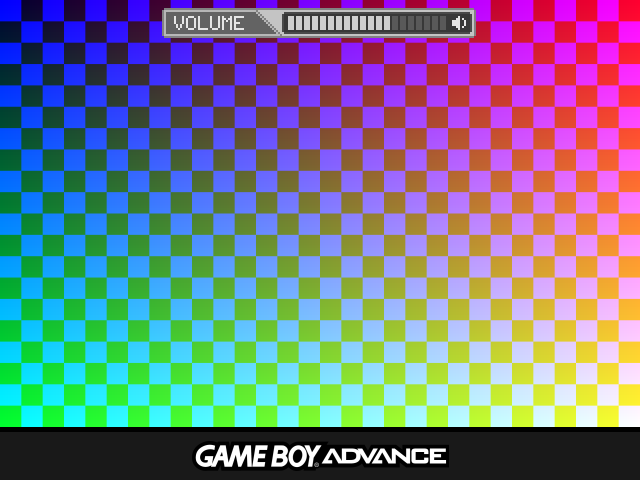
Solid carts in their own plastics with real label scans. The one you are on floats and sways; tap A and it goes down into the handheld, and the game comes on like a tube TV and resumes from its last save state. Hold MENU in a game to save a state, eject the cart and go back to the shelf.
A SNES game from the USA stands as the American SNES cart, and one from Japan, Europe or anywhere else as the Super Famicom cart, as it was sold. A PlayStation game stands as its disc; one on several discs stands as a stack of them, a gap between each, and the whole stack goes down into the handheld. In a game, SELECT+MENU opens DISC to put another disc in.
The shelf's system, GBA, GB, GBC, SNES or PS1, shows in a pill in the bottom bar; L1 and R1 change it, and Up and Down jump to a letter. Game Boy carts stand at 80%.
Settings
START on the shelf opens Settings, in windows in the style of Mega Man Zero's menus: the carts go out to the left as it comes in from the right. Inside Settings every screen slides, over a background that keeps moving.
CONFIGS holds Fast Forward, Fast Forward Sound, Colour Correction, Rumble and Labels; GENERAL holds Date & Time, Network, Bluetooth, Theme and About.
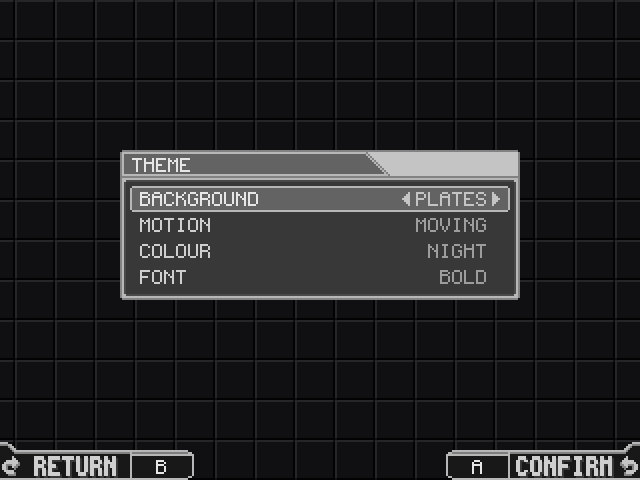
Theme
Theme picks the background's pattern, its motion and its colour, which the menus and both bars take: Night is grey, Amber is Mega Man Zero's own. It also picks the bottom bar's font, Bold or Thin.
Theme this page
This page takes its colours from the background's too. Pick a row and change it with Left and Right, as on the handheld.
The page drifts like the shelf unless your system asks for less motion.
Highlights
The shelf
Game Boy carts in their own plastics, SNES carts in the American or the Super Famicom shape and PlayStation discs, with real label scans, modelled low-poly and drawn the way a PlayStation drew 3D. The one you are on floats and sways; A pulls it down out of the screen into the handheld, and the game comes on like a tube TV. At power-on, an opening after Mega Man X5's boot terminal fades into the shelf.
Five cores
mGBA and gpSP for the GBA and Snes9x and Supafaust for the SNES, chosen per cart; PCSX ReARMed for the PlayStation, a BIOS of its own built in. GBA fills a 640x480 screen and the PlayStation fills it at 4:3; the SNES is drawn at twice its size and Game Boy stays at 3x.
Pick up, rewind
Resume on boot, save states with a switcher, rewind (not on the PlayStation), fast-forward, and turbo buttons on the Game Boys.
Link play
Between two handhelds over Wi-Fi, for Game Boy and GBA games: Pokémon trades, Advance Wars, Mario Kart and Tetris.
Settings
On START, in windows in the style of Mega Man Zero's menus that slide from screen to screen, over a background that keeps moving: CONFIGS and GENERAL.
Controls
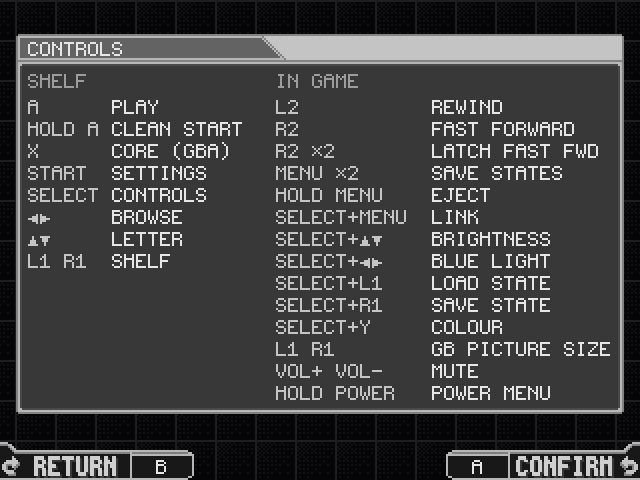
A tap of SELECT opens CONTROLS: what every button does, on the shelf and in a game, on one panel.
Network
Home Wi-Fi, network time, and SSH and SFTP, each ON or OFF. Y on one opens its panel: SSH's shows the login and root's own random password. Cart labels are fetched from ScreenScraper.
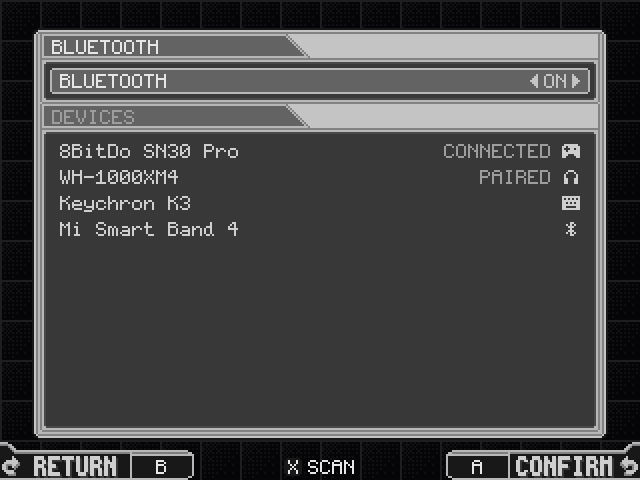
Bluetooth
On handhelds that have it: pair a device and connect it, or forget it. Game sound and gamepads over Bluetooth are still to come.
Theme
The background's pattern, its motion and its colour, which the menus and both bars take, and the bottom bar's font, Bold or Thin.
Pixel look
A pixel font, a top bar with the radios, clock and battery, and a bottom bar with the buttons.
Credits and licence
- Based on slot by Brandon T. Kowalski (GPL-3.0). The code that hosts the cores, with their saves, sound and input, is still largely his.
- BaseOS by pvaibhav.
- Emulation by mGBA (MPL-2.0) and gpSP (GPL-2.0) for the Game Boys; Snes9x (free for non-commercial use only) and Supafaust, Mednafen's snes_faust (GPL-2.0), for the SNES; and PCSX ReARMed (GPL-2.0) for the PlayStation. Their licences and patches, and the source of all but mGBA, ship in System/licenses/.
- Type is Pixel Code by Qwerasd (SIL OFL 1.1); every icon is drawn as pixel art. The LCD mask is derived from GigaHerz's LCD3x.
- Cart labels come from ScreenScraper, fetched with your own account.
omega-zero is free software under the GPL-3.0-or-later. This page is drawn with its UI kit.
Game Boy, Game Boy Color, Game Boy Advance, Super Nintendo Entertainment System and Super Famicom are trademarks of Nintendo. PlayStation is a trademark of Sony Interactive Entertainment. Anbernic is a trademark of its owner. This project is not affiliated with any of them.